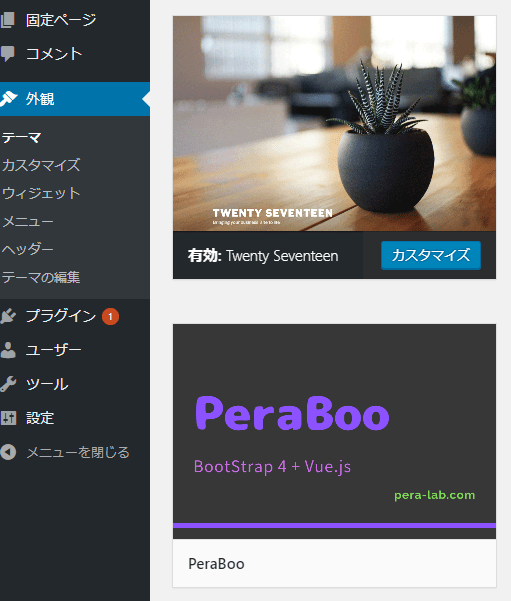
オリジナルテーマを作成する場合に最低限必要なファイル
テーマフォルダを作成
テーマフォルダ(英数字)を作成します。
例)PeraBoo
最低限必要なファイル
- index.php
- style.css
- screenshot.png ※任意
index.php
たたき台となるサンプルは下記の通り。
<!DOCTYPE html>
<html <?php language_attributes(); ?>>
<head>
	<meta charset="<?php bloginfo( 'charset' ); ?>" />
	<meta http-equiv="X-UA-Compatible" content="IE=edge">
	<meta name="viewport" content="width=device-width, initial-scale=1, shrink-to-fit=no, viewport-fit=cover"/>
	<title><?php wp_title(); ?></title>
	<meta name="description" content="<?php bloginfo( 'description' ); ?>">
	<link rel="stylesheet" href="<?php echo get_stylesheet_uri(); ?>" type="text/css" media="screen" />
	<link rel="pingback" href="<?php bloginfo( 'pingback_url' ); ?>" />
	<?php if ( is_singular() && get_option( 'thread_comments' ) ) wp_enqueue_script( 'comment-reply' ); ?>
	<?php wp_head(); ?>
</head>
<body <?php body_class(); ?>>

<?php
if ( have_posts() ) {	//記事の有無を確認してからループ実行
	while ( have_posts() ) {	//記事が無くなるまでループ
		the_post(); 	//投稿記事のロード。この後、他のthe_xxx系の関数で記事の内容を取得できる
?>
		<!-- ここにループ内の処理を記述 -->
		<article <?php post_class(); ?>>
			<h1><?php the_title(); ?></h1>
			<?php the_content(); ?>
		</article>
<?php
	}
}
?>

<?php wp_footer(); ?>
</body>
</html>
ここでは最低限必要なファイル構成のためindex.phpに<head>タグを書いていますが、実際にオリジナルテーマを作成する場合、赤字の部分はheader.php、footer.phpにそれぞれ記述し、index.phpなどからは <?php get_header(); ?>、<?php get_footer(); ?> で呼び出す形に変わります。
<head>タグの内容は以下のルールをチェックしながら作ります。
- 適切な DOCTYPE を使う。
- <html> タグには language_attributes() を含める。
- <meta> 要素の charset 属性は、<title> を含む全ての要素より前に挿入する。
- <meta> 要素の charset と description 属性の指定には bloginfo() を使う。
- <title> 要素の指定には wp_title() を使う。理由はこの項 (訳注: 未訳。en) を参照。
- フィードリンクを追加するには Automatic Feed Links /en を使う。
- </head> 終了タグよりも前に wp_head() を挿入する。プラグインはこのアクションフックを使ってスクリプトやスタイルシート、その他の機能を追加する。
- ヘッダーテンプレートにテーマのスタイルシートをリンクしないでください。 代わりにテーマ関数のアクションフック wp_enqueue_scripts を使う。
style.cssの中身
WordPressにテーマとして認識されるためには、style.cssの先頭(@charsetの次)にテーマの詳細情報を記述する必要があります。
style.css
@charset "UTF-8";
/*
Theme Name: テーマの名前
Theme URI: テーマを紹介しているサイトURL
Author: 作者名
Author URI: 作者のサイトURL
Description: テーマの詳細な説明
Version: テーマのバージョン番号
License: ライセンス
License URI: ライセンスのサイトURL
Text Domain: 翻訳ファイル
Tags: 検索タグ
*/
全てを記述する必要はなく、各項目は省略可能です。
最低限、赤字の部分は埋めとけば問題ないかと思います。
公式テーマのtwenty系は@charsetが記述されていませんが、style.css内でマルチバイト文字(日本語)を扱う(または可能性のある)オリジナルテーマの場合は、先頭に@charsetを記述しておきましょう。
公式テーマの「Twenty Seventeen」の場合、このようになっています。
/*
Theme Name: Twenty Seventeen
Theme URI: https://wordpress.org/themes/twentyseventeen/
Author: the WordPress team
Author URI: https://wordpress.org/
Description: Twenty Seventeen brings your site to life with header video and immersive featured images. With a focus on business sites, it features multiple sections on the front page as well as widgets, navigation and social menus, a logo, and more. Personalize its asymmetrical grid with a custom color scheme and showcase your multimedia content with post formats. Our default theme for 2017 works great in many languages, for any abilities, and on any device.
Version: 2.0
License: GNU General Public License v2 or later
License URI: http://www.gnu.org/licenses/gpl-2.0.html
Text Domain: twentyseventeen
Tags: one-column, two-columns, right-sidebar, flexible-header, accessibility-ready, custom-colors, custom-header, custom-menu, custom-logo, editor-style, featured-images, footer-widgets, post-formats, rtl-language-support, sticky-post, theme-options, threaded-comments, translation-ready

This theme, like WordPress, is licensed under the GPL.
Use it to make something cool, have fun, and share what you've learned with others.
*/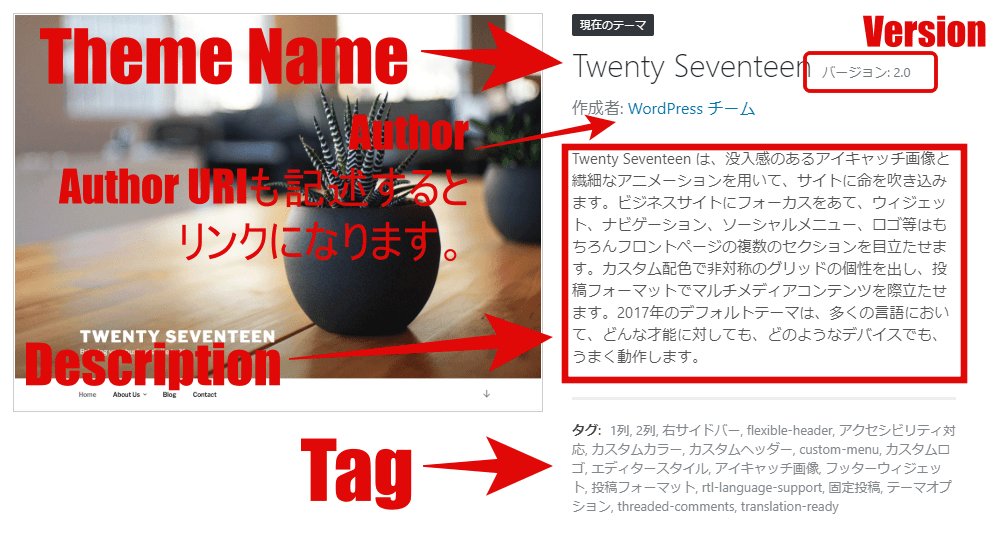
複数言語対応のためのText Domainが記述されているので、DescriptionやTagsは翻訳されていますね。
WordPress.orgに登録しない場合のオリジナルテーマで、スプリットライセンスを用いる場合、こんな感じになるかと思います。
@charset "UTF-8";
/*
Theme Name: PeraBoo
Theme URI: https://pera-lab.com/theme-boot
Author: ぺらラボ
Author URI: https://pera-lab.com/
Description: BootStrap4 + Vue.jsベースのテーマです。
Version: 1.0
License: テーマ内のPHPファイルはGPL License。画像、CSS、JavaScriptはpera-lab.comが著作権を有しています。BootStrap4、Vue.jsはそれぞれの著作者、団体が有しています。
*/
ライセンスがちょっと長いのでLicense URIだけを記述し、そちらにまとめても良いかもしれませんね。
ライセンス
配布する場合はLicenseを省略せずにはっきりと明示しましょう。
WordPressは100%GPLが推奨されていますが、有料テーマの場合、PHPのみをGPLライセンスとし、CSS、画像、JavaScriptを制作者のものとするスプリットライセンスが用いられています。
※テーマのPHPはWordPressのシステムがなければ動作しないため、GPLライセンスから逃れられません。
管理画面から探せるようにWordPress.orgに登録したい場合、100%GPLが求められます。
参考までに公式テーマ「Twenty Seventeen」の場合、このように記述されています。
License: GNU General Public License v2 or later
License URI: http://www.gnu.org/licenses/gpl-2.0.html
有料テーマによっては、別にtxtファイルを添付していたり、License URIだけを記述し、ライセンスの詳細をそちらに載せている場合もありました。
Text Domain
複数言語に対応する場合に設定します。
1つの言語のみ(日本語のみ)の場合は省略可能です。
関数リファレンス/load theme textdomain
検索タグ
WordPress.orgに登録し、管理画面から検索できるテーマの場合の検索タグを設定します。
WordPress.orgに登録しない場合は、省略可能です。
公式テーマの「Twenty Seventeen」の場合
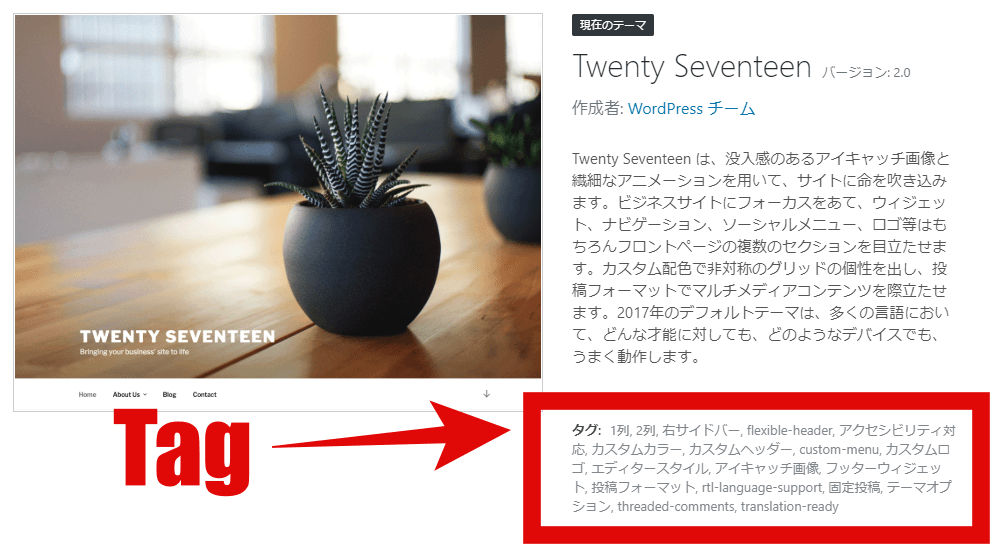
Tags: one-column, two-columns, right-sidebar, flexible-header, accessibility-ready, custom-colors, custom-header, custom-menu, custom-logo, editor-style, featured-images, footer-widgets, post-formats, rtl-language-support, sticky-post, theme-options, threaded-comments, translation-readyテーマの詳細画面を見るとこのように表示されています。
screenshot.png
管理画面に表示されるテーマの画像です。
PNG画像だけでなくjpg画像(screenshot.jpg)、GIF画像でも認識します。
しかし .jpg .jpeg .gif は推奨から外れるため、pngで作成しましょう。
横 880px、縦660px で作成します。
省略した場合は画像が表示されませんが、動作に影響はありません。
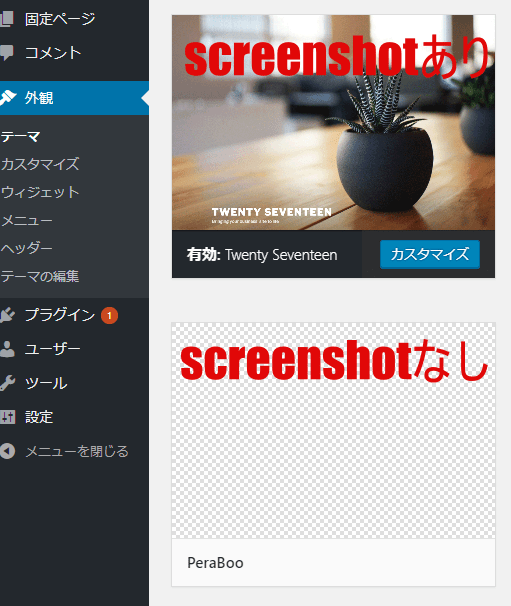
screenshot.pngをテーマフォルダに配置すればこの通り。